Building A Pizza Pairing Engine Built End-to-End with AI
Overview
Misto is a pizza ingredient pairing web application built for creative, independent pizza chefs who want to break out of familiar combinations. It uses Claude AI to power mood-based ingredient discovery, contextual pairing analysis, and live harmony scoring. I designed and built it solo, from product definition through deployment, using AI as a collaborator at every stage of the process. Through this project I developed a repeatable framework for deciding when AI belongs in a product feature and when it doesn't. I call it the AI Touchpoint Analysis.
Categories
AI Development
Claude
Date
2026
Client
Misto
Opportunity
Throwing pizza parties for friends and family has been something I've loved ever since I got a backyard pizza oven. One of my favorite parts is creating inventive recipes. Pairing different ingredients and balancing flavor notes feels like a true creative process, and that sparked an idea to build an AI-driven pizza builder and ingredient pairing engine.
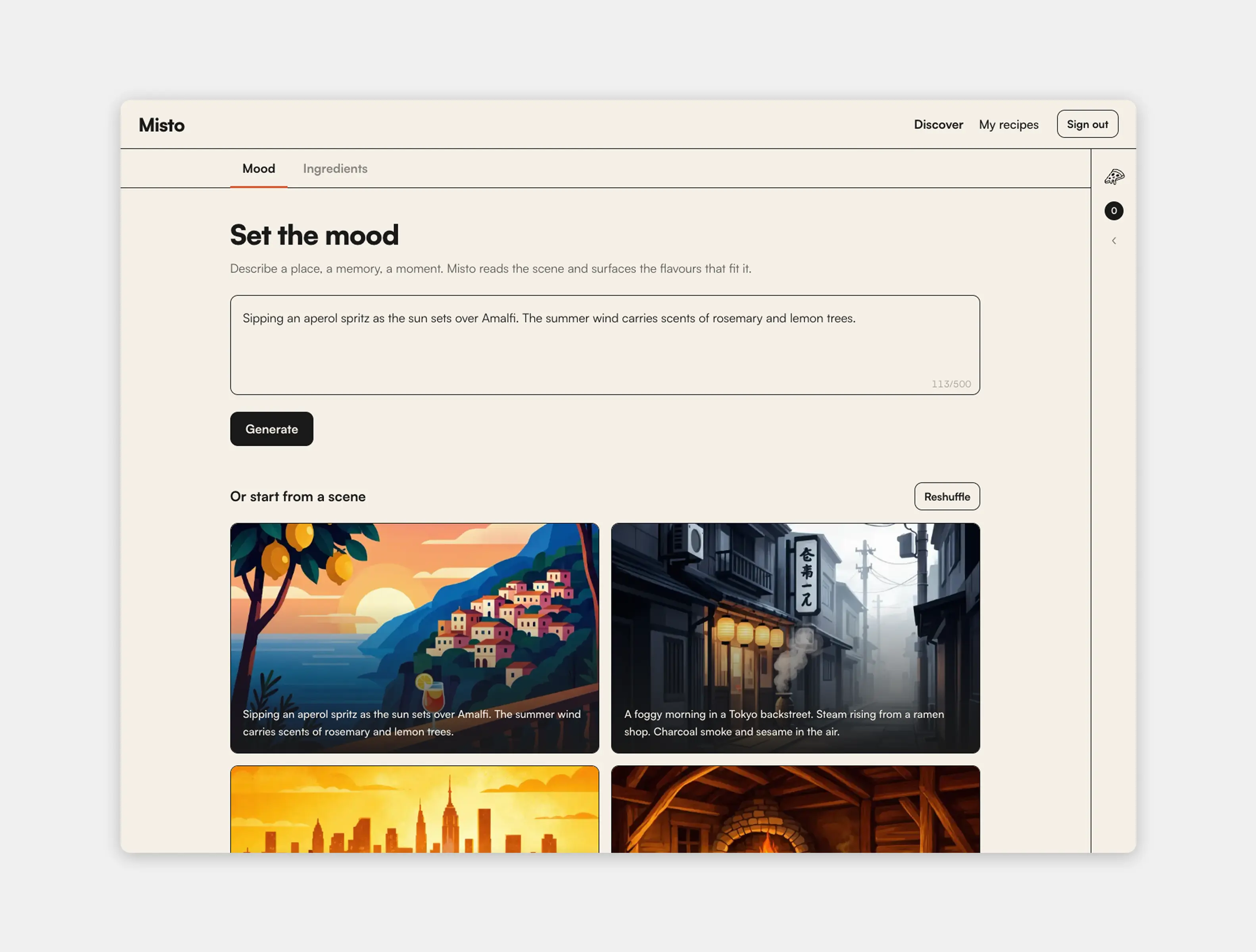
The tools that exist in this space are either designed for fine dining or built around dense databases that feel nothing like how a chef actually thinks. I wanted to build something for the kind of pizza maker who thinks in terms of mood, provenance, and story. Someone who'd rather start from "a foggy morning in a Tokyo backstreet" than a flavor compound lookup.
The result is Misto, Italian for "mixed." A fully functional app built with Claude Code. Misto lets chefs discover ingredients through a mood or scene prompt, explore a curated library, or start with a known ingredient and find what pairs with it. Every combination feeds into a live harmony scoring system powered by Claude.
Live demo link here
Planning with an AI co-author
Whenever I build new products with Claude Code I generally follow the same process: plan/ideate with Claude -> create architecture document -> craft a PRD -> map dependencies and create roadmap -> build -> refine. This whole process isn't "generate a spec and paste it in." It's a genuine back-and-forth: I push back on decisions, Claude surfaces tradeoffs, and we land somewhere more considered than either of us would have arrived at alone.
With this project the process also revealed real tension in building an AI-native product: when your planning tool is the same as your implementation tool, it's easy to end up with a plan that defaults to AI everywhere. Not because AI is the right answer in each case, but because AI is what's top of mind.
That's exactly what happened with the mood and scene feature. The original plan called for Claude to generate a fresh set of ingredients every time a user entered a prompt. Novel, contextual, impressive-sounding. But also slow, expensive, and inconsistent. Two users entering similar prompts could get meaningfully different results for no good reason.
I caught it, but only after I'd committed to the feature design. Reworking it mid-build was the inflection point that shaped the rest of the project.
The AI Touchpoint Analysis
After rethinking the mood feature, I went back through the entire product and audited every place I'd planned to make a Claude call. I started asking a harder question than "can AI do this?" The question was: does AI need to be here, and if so, in what form?
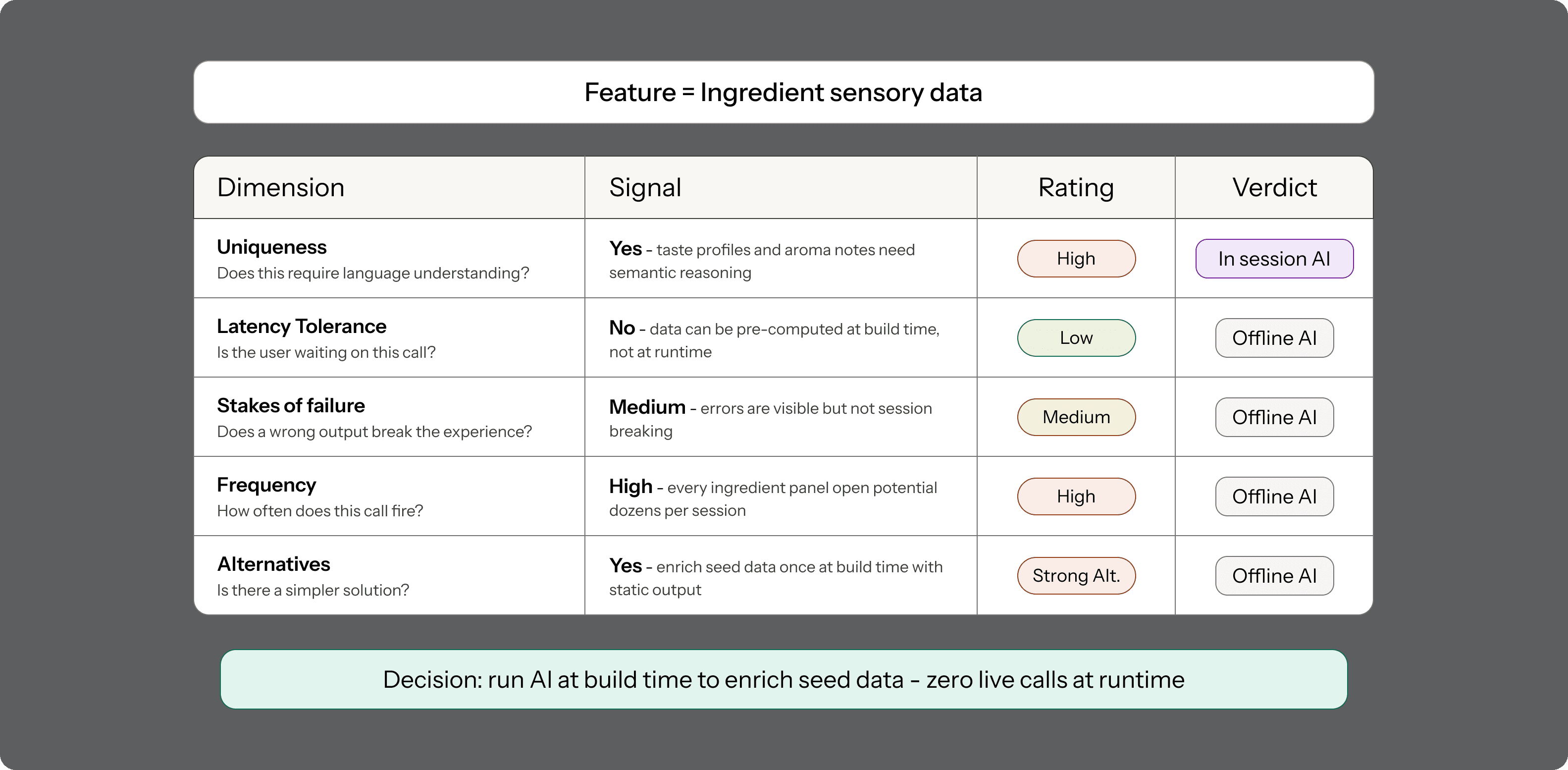
That line of thinking became what I now call the AI Touchpoint Analysis. For each feature, I evaluated it across a few dimensions:
Uniqueness: does this genuinely require language understanding, or could a rule-based or static solution do the same job?
Latency tolerance: is the user waiting on this call, or can it happen in the background?
Stakes of failure: if the output is wrong or inconsistent, does the experience break, or is it recoverable?
Frequency: how often does this fire? A call that fires on every ingredient add compounds quickly.
Alternatives: is there a faster, simpler, or more predictable way to achieve the same outcome? Static data, rule-based logic, and pre-computation should always be considered before defaulting to a live AI call.
Running every AI touchpoint through that filter produced a cleaner, more defensible architecture. The key distinction that emerged was between AI that runs offline, enriching static data at build time, and AI that runs online in the user's hot path.
Mood and scene discovery was the clearest win from this thinking. Instead of generating ingredients fresh on each prompt, I built a curated library of 100+ ingredients and had the mood prompt produce intelligent filters over that library. The user gets a contextual, editorial result that feels generated, but the underlying data is stable and instant. Claude's work happens upstream and the runtime experience is fast and consistent.
Ingredient sensory data followed the same logic. Rather than calling Claude every time a user opened an ingredient detail panel, I used AI to enrich the seed data upfront, generating taste profiles, aroma notes, and natural pairings for each ingredient in the library. Static at runtime, AI-powered at build time.
The pizza-aware analysis is where I kept Claude in the hot path, but deliberately. Comparing a specific ingredient against the actual pizza a chef is currently building is an inherently contextual problem. No static lookup can do that. The latency is real and the user knows they're waiting on something meaningful. That's the right place for a live API call.
The framework didn't eliminate AI from the product. It clarified where AI earns its place.
Building solo, with AI in the loop
The development process was split across two tools. Design and product decisions happened here in Claude.ai, where I could think through problems conversationally. Implementation happened in Claude Code, where I'd provide context through a /Context directory containing the PRD, architecture docs, and a CLAUDE.md file, so the coding environment had everything it needed before scaffolding anything.
This separation of concerns turned out to be important. The conversational planning mode and the implementation mode serve different cognitive jobs, and keeping them distinct helped me stay clearer about which mode I was in. When I blurred the line, trying to make product decisions inside a coding session or trying to get implementation specifics out of a planning conversation, things got muddier.
The build itself followed a phased roadmap, working from data integrity through to deployment. The ingredient seed file, the API architecture, the prompt engineering, the UI components, and the harmony scoring system each got their own phase. Shipping incrementally and being willing to revisit earlier decisions when later phases surfaced problems was what made the solo build sustainable.
Prompt engineering as a design problem
Getting Claude to return reliable, structured JSON across four different prompt types (mood extraction, ingredient pairing, harmony scoring, and conflict detection) turned out to be a more deliberate design problem than I expected. The outputs feed directly into UI components, which means a malformed response isn't just a backend error, it's a broken interface.
The solution was treating each prompt like a component with a contract: a clearly specified output schema, explicit instructions on format, and defensive parsing on the client side that handled edge cases gracefully. The API timeout also had to be tuned twice during the build. Real Sonnet latency was higher than I'd planned for, and a timeout that's too tight turns a slow response into a confusing failure.
This is the kind of thing that only shows up when you're building, not planning.
Result
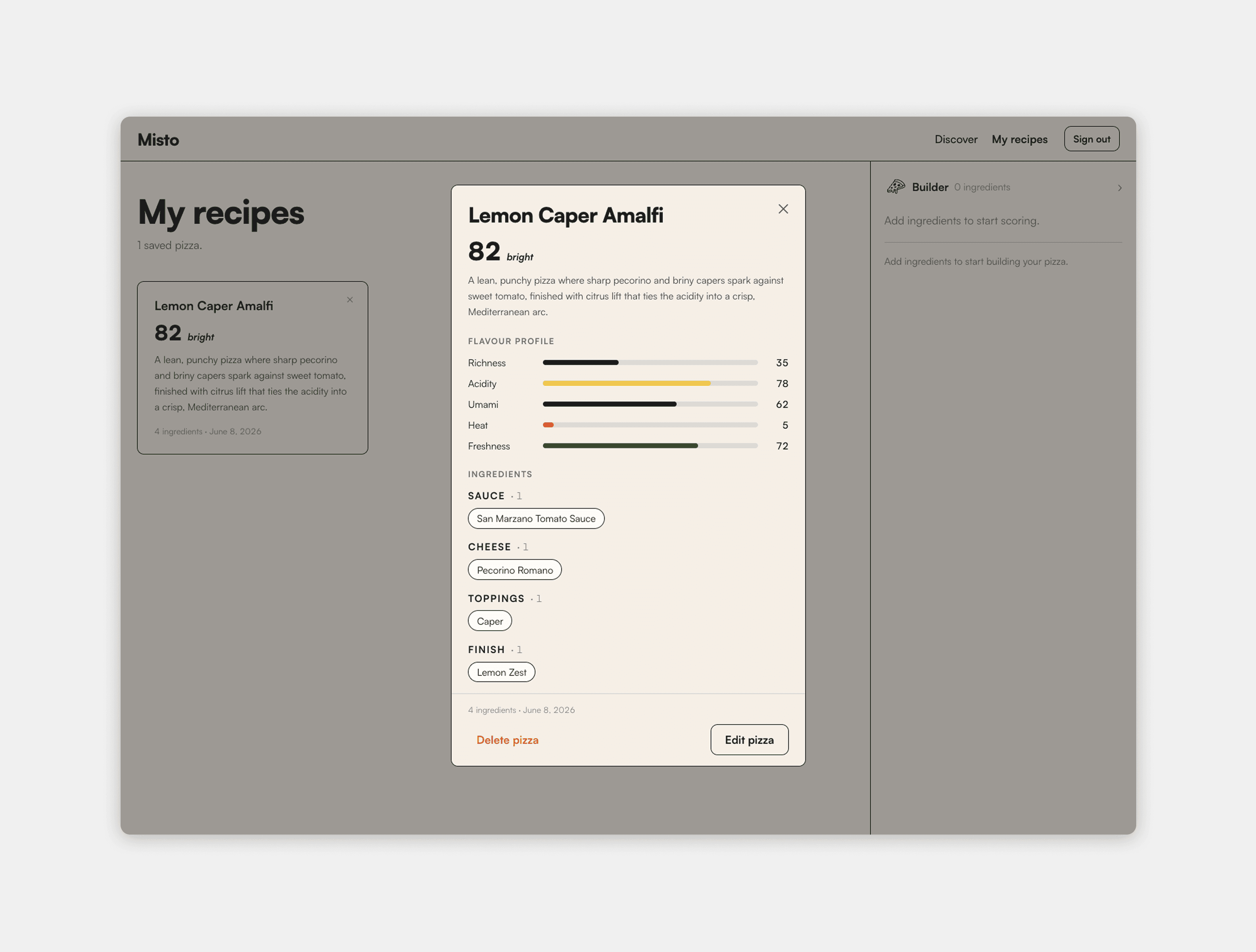
Misto launched as a fully functional, publicly deployed web application. The complete discovery-to-save flow works end-to-end: mood and scene entry, ingredient browsing, live harmony scoring, conflict detection, and a personal recipe book. All four Claude API prompts are integrated and returning structured data. The ingredient library covers 100+ items across all food categories, with enriched sensory data for each.
The visual design follows an editorial, high-contrast aesthetic with bold typography, flat cards, and a warm parchment palette, aimed at the same creative chef audience the product serves. The app is responsive, fast where it needs to be, and honest about wait times where it isn't.
Live demo link here

Reflection
I'd run the AI Touchpoint Analysis before writing a single line of the PRD, not after I'd already designed around the wrong approach for two features.
The framework emerged from a mistake I caught mid-build. It would have been a better foundation than a correction. Starting with the question "where does AI genuinely need to be in the hot path?" would have shaped the data model, the API design, and the UX flows from the beginning, rather than requiring me to rework them when the gaps became obvious.
The deeper lesson is one I didn't expect going in: the hardest part of building an AI product isn't getting the AI to work. It's resisting the pull to use it everywhere. AI has a gravity to it, especially when you're building something that's explicitly about AI. The Touchpoint Analysis was my way of fighting that gravity. Next time, I'll use it from day one.
Building A Pizza Pairing Engine Built End-to-End with AI
Overview
Misto is a pizza ingredient pairing web application built for creative, independent pizza chefs who want to break out of familiar combinations. It uses Claude AI to power mood-based ingredient discovery, contextual pairing analysis, and live harmony scoring. I designed and built it solo, from product definition through deployment, using AI as a collaborator at every stage of the process. Through this project I developed a repeatable framework for deciding when AI belongs in a product feature and when it doesn't. I call it the AI Touchpoint Analysis.
Categories
AI Development
Claude
Date
2026
Client
Misto
Opportunity
Throwing pizza parties for friends and family has been something I've loved ever since I got a backyard pizza oven. One of my favorite parts is creating inventive recipes. Pairing different ingredients and balancing flavor notes feels like a true creative process, and that sparked an idea to build an AI-driven pizza builder and ingredient pairing engine.
The tools that exist in this space are either designed for fine dining or built around dense databases that feel nothing like how a chef actually thinks. I wanted to build something for the kind of pizza maker who thinks in terms of mood, provenance, and story. Someone who'd rather start from "a foggy morning in a Tokyo backstreet" than a flavor compound lookup.
The result is Misto, Italian for "mixed." A fully functional app built with Claude Code. Misto lets chefs discover ingredients through a mood or scene prompt, explore a curated library, or start with a known ingredient and find what pairs with it. Every combination feeds into a live harmony scoring system powered by Claude.
Live demo link here
Planning with an AI co-author
Whenever I build new products with Claude Code I generally follow the same process: plan/ideate with Claude -> create architecture document -> craft a PRD -> map dependencies and create roadmap -> build -> refine. This whole process isn't "generate a spec and paste it in." It's a genuine back-and-forth: I push back on decisions, Claude surfaces tradeoffs, and we land somewhere more considered than either of us would have arrived at alone.
With this project the process also revealed real tension in building an AI-native product: when your planning tool is the same as your implementation tool, it's easy to end up with a plan that defaults to AI everywhere. Not because AI is the right answer in each case, but because AI is what's top of mind.
That's exactly what happened with the mood and scene feature. The original plan called for Claude to generate a fresh set of ingredients every time a user entered a prompt. Novel, contextual, impressive-sounding. But also slow, expensive, and inconsistent. Two users entering similar prompts could get meaningfully different results for no good reason.
I caught it, but only after I'd committed to the feature design. Reworking it mid-build was the inflection point that shaped the rest of the project.
The AI Touchpoint Analysis
After rethinking the mood feature, I went back through the entire product and audited every place I'd planned to make a Claude call. I started asking a harder question than "can AI do this?" The question was: does AI need to be here, and if so, in what form?
That line of thinking became what I now call the AI Touchpoint Analysis. For each feature, I evaluated it across a few dimensions:
Uniqueness: does this genuinely require language understanding, or could a rule-based or static solution do the same job?
Latency tolerance: is the user waiting on this call, or can it happen in the background?
Stakes of failure: if the output is wrong or inconsistent, does the experience break, or is it recoverable?
Frequency: how often does this fire? A call that fires on every ingredient add compounds quickly.
Alternatives: is there a faster, simpler, or more predictable way to achieve the same outcome? Static data, rule-based logic, and pre-computation should always be considered before defaulting to a live AI call.
Running every AI touchpoint through that filter produced a cleaner, more defensible architecture. The key distinction that emerged was between AI that runs offline, enriching static data at build time, and AI that runs online in the user's hot path.
Mood and scene discovery was the clearest win from this thinking. Instead of generating ingredients fresh on each prompt, I built a curated library of 100+ ingredients and had the mood prompt produce intelligent filters over that library. The user gets a contextual, editorial result that feels generated, but the underlying data is stable and instant. Claude's work happens upstream and the runtime experience is fast and consistent.
Ingredient sensory data followed the same logic. Rather than calling Claude every time a user opened an ingredient detail panel, I used AI to enrich the seed data upfront, generating taste profiles, aroma notes, and natural pairings for each ingredient in the library. Static at runtime, AI-powered at build time.
The pizza-aware analysis is where I kept Claude in the hot path, but deliberately. Comparing a specific ingredient against the actual pizza a chef is currently building is an inherently contextual problem. No static lookup can do that. The latency is real and the user knows they're waiting on something meaningful. That's the right place for a live API call.
The framework didn't eliminate AI from the product. It clarified where AI earns its place.
Building solo, with AI in the loop
The development process was split across two tools. Design and product decisions happened here in Claude.ai, where I could think through problems conversationally. Implementation happened in Claude Code, where I'd provide context through a /Context directory containing the PRD, architecture docs, and a CLAUDE.md file, so the coding environment had everything it needed before scaffolding anything.
This separation of concerns turned out to be important. The conversational planning mode and the implementation mode serve different cognitive jobs, and keeping them distinct helped me stay clearer about which mode I was in. When I blurred the line, trying to make product decisions inside a coding session or trying to get implementation specifics out of a planning conversation, things got muddier.
The build itself followed a phased roadmap, working from data integrity through to deployment. The ingredient seed file, the API architecture, the prompt engineering, the UI components, and the harmony scoring system each got their own phase. Shipping incrementally and being willing to revisit earlier decisions when later phases surfaced problems was what made the solo build sustainable.
Prompt engineering as a design problem
Getting Claude to return reliable, structured JSON across four different prompt types (mood extraction, ingredient pairing, harmony scoring, and conflict detection) turned out to be a more deliberate design problem than I expected. The outputs feed directly into UI components, which means a malformed response isn't just a backend error, it's a broken interface.
The solution was treating each prompt like a component with a contract: a clearly specified output schema, explicit instructions on format, and defensive parsing on the client side that handled edge cases gracefully. The API timeout also had to be tuned twice during the build. Real Sonnet latency was higher than I'd planned for, and a timeout that's too tight turns a slow response into a confusing failure.
This is the kind of thing that only shows up when you're building, not planning.
Result
Misto launched as a fully functional, publicly deployed web application. The complete discovery-to-save flow works end-to-end: mood and scene entry, ingredient browsing, live harmony scoring, conflict detection, and a personal recipe book. All four Claude API prompts are integrated and returning structured data. The ingredient library covers 100+ items across all food categories, with enriched sensory data for each.
The visual design follows an editorial, high-contrast aesthetic with bold typography, flat cards, and a warm parchment palette, aimed at the same creative chef audience the product serves. The app is responsive, fast where it needs to be, and honest about wait times where it isn't.
Live demo link here
Reflection
I'd run the AI Touchpoint Analysis before writing a single line of the PRD, not after I'd already designed around the wrong approach for two features.
The framework emerged from a mistake I caught mid-build. It would have been a better foundation than a correction. Starting with the question "where does AI genuinely need to be in the hot path?" would have shaped the data model, the API design, and the UX flows from the beginning, rather than requiring me to rework them when the gaps became obvious.
The deeper lesson is one I didn't expect going in: the hardest part of building an AI product isn't getting the AI to work. It's resisting the pull to use it everywhere. AI has a gravity to it, especially when you're building something that's explicitly about AI. The Touchpoint Analysis was my way of fighting that gravity. Next time, I'll use it from day one.